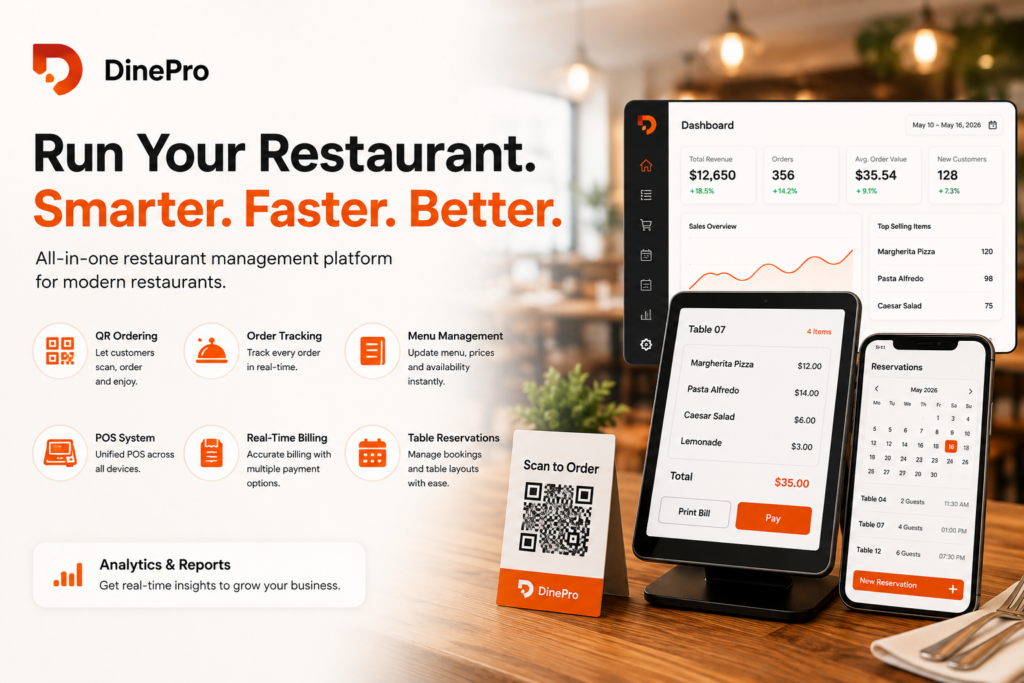
Running a restaurant today means juggling far more than good food. Owners and managers are expected to handle order accuracy, table turnover, staff coordination, billing, inventory awareness, and customer experience — often all at once, during a dinner rush, with a skeleton staff. DinePro is a restaurant management platform built to bring all of these moving parts into a single system, combining QR-based self-ordering, a point-of-sale (POS) terminal, table reservations, real-time billing, and analytics reporting into one connected tool.
This article walks through what DinePro is, how each core feature works, who it’s built for, and why an all-in-one platform like this has become the standard restaurants are moving toward in 2026.
What Is DinePro?
DinePro is an all-in-one restaurant management platform that automates dine-in operations end-to-end. Instead of running separate tools for ordering, billing, table management, and reporting, DinePro consolidates them into one system that works across tablets, desktops, and POS terminals. Its core promise is simple: scan, order, enjoy — customers scan a QR code at their table, place their own order, and the restaurant’s staff, kitchen, and billing system stay in sync automatically, without manual re-entry at any step.
For restaurant owners, this translates into fewer order errors, faster table turnover, and clearer visibility into what’s actually happening across the business on any given day — without needing to be physically present at every station.
Core Feature 1: QR Placed Ordering
At the center of DinePro is QR-based self-ordering. Each table gets a unique QR code; customers scan it with their own phone, browse the live menu, and place their order directly — no app download, no waiting for a server to take the order.
This does more than save labor. It reduces the classic sources of dine-in error: mis-heard orders, forgotten modifiers, and the lag between a table deciding what they want and a server actually reaching them. Because the order goes straight into the kitchen and billing system, there’s no handoff where details can get lost. Customers also tend to order more comfortably when they’re browsing at their own pace rather than feeling rushed by a server standing at the table — which restaurants using self-order systems commonly report as a modest lift in average order value.
Core Feature 2: Real-Time Order Tracking
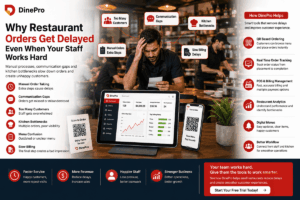
Once an order is placed, DinePro tracks it in real time from kitchen to table. Staff and managers can see exactly where each order stands — received, in preparation, ready, served — from any connected device. This matters most during peak hours, when a kitchen might be juggling twenty or more simultaneous orders across different tables and course stages.
Real-time tracking also gives managers a live operational view: which tables are waiting longest, where the kitchen is bottlenecking, and which orders need attention before a customer has to ask. That visibility is the difference between reacting to problems after a customer complains and catching them before they happen.
Core Feature 3: Menu Management
DinePro includes a menu management tool that lets restaurants create, update, and organize their menu without needing a developer or a reprint every time something changes. Prices, availability, descriptions, and categories can be updated instantly — which matters for restaurants that run daily specials, seasonal items, or need to 86 a dish mid-service when it sells out.
Because the QR ordering system pulls directly from this same menu data, there’s no separate “digital menu” to keep in sync with a “printed menu” — there’s just one source of truth that updates everywhere at once, including on customers’ phones in real time.
Core Feature 4: Point-of-Sale (POS) System
DinePro’s POS works across tablets, desktops, and dedicated POS terminals, so restaurants aren’t locked into one specific piece of hardware. It’s built to sit alongside the QR ordering and table management features rather than as a bolted-on separate system, which means orders placed by customers via QR code and orders entered by staff manually both flow into the same POS and billing pipeline.
This matters for restaurants running a mixed front-of-house model — some tables ordering via QR, others being served traditionally, some picking up counter orders — since it avoids the common problem of running two disconnected systems that don’t reconcile with each other at the end of the night.
Core Feature 5: Real-Time Billing and Multiple Payment Modes
Billing in DinePro generates accurate checks instantly, with built-in support for tax and discount rules, so staff aren’t manually calculating totals or applying promotions by hand. The system supports multiple payment modes — cash, card, UPI, digital wallets, and split payments — covering the range of ways dine-in customers actually want to pay, including groups that want to split a bill by item or by person.
Instant, accurate billing also reduces a quieter source of revenue leakage: manual calculation errors and inconsistently applied discounts, which are easy to miss individually but add up across a month of service.
Core Feature 6: Table Reservations
DinePro’s reservation tools let restaurants manage table bookings and coordinate across multiple events, dates, and locations from one place. For a restaurant, this means front-of-house staff aren’t manually cross-checking a paper book or spreadsheet against walk-ins and existing reservations — the system keeps table availability and booking status updated in real time, reducing double-bookings and awkward “the system says we’re free but we’re not” moments.
For restaurants that host private events, large parties, or multiple seatings a night, being able to coordinate reservations across different dates and floor layouts inside the same platform that already runs ordering and billing removes a significant amount of manual reconciliation work.
Core Feature 7: Daily Reports and Analytics
DinePro generates sales summaries, staff performance data, and payment reports with a single click. Instead of an owner manually pulling numbers together at the end of the week — or worse, not having visibility into performance at all — DinePro surfaces this data as a normal part of daily operations.
This kind of reporting turns a restaurant’s day-to-day operational data (what sold, when, by whom, and how it was paid for) into something an owner can actually act on: adjusting staffing for slow shifts, identifying which menu items are underperforming, or spotting a payment reconciliation issue before it becomes a bigger problem.
Who Is DinePro Built For?
Based on its feature set, DinePro is designed for a fairly broad range of dine-in food businesses:
- Independent restaurants and bistros that want to modernize ordering and billing without hiring a large tech or admin staff.
- Cafés looking to reduce order-taking workload through self-service QR ordering.
- Restaurant groups managing multiple events, dates, or seating layouts, where the reservation and coordination tools matter most.
- Owner-operators working solo or with a lean team, since the platform is explicitly built around making it “easy to work smarter when you’re working solo” — automating tasks that would otherwise require dedicated staff or separate software subscriptions.
Customers of the platform, as reflected in reviews from bistro owners, restaurant managers, and café owners, consistently point to three recurring benefits: fewer order errors, faster service, and reduced staff workload from self-ordering — the direct results of connecting ordering, kitchen tracking, and billing into a single flow instead of three disconnected ones.
Why an All-in-One Platform Matters More Than Point Solutions
A lot of restaurants historically cobble together separate tools: one app for QR ordering, a different POS, a separate reservation book, and a spreadsheet for reporting. Each tool on its own might work fine — but the gaps between them are where problems live. An order placed via a QR app that doesn’t talk to the POS means someone has to re-enter it. A reservation system that doesn’t know what the POS is doing means double-booked tables. A report that has to be manually assembled from three different exports means owners often just don’t look at the data at all.
DinePro’s core design decision — QR ordering, POS, table management, billing, and reporting inside one connected system — removes those gaps by construction rather than by process discipline. Nothing needs to be manually reconciled between systems because there’s only one system.
Frequently Asked Questions
How does Order Tracking work? Order Tracking enables real-time monitoring of customer orders, ensuring timely updates for both restaurant staff and customers, and helps streamline kitchen operations and improve service efficiency.
How does QR Placed Ordering benefit customers? It lets customers place their own order directly from their phone at their own pace, without waiting for a server, which reduces order errors and speeds up the time between deciding what to order and the kitchen receiving it.
Can I update my menu in real time? Yes. DinePro’s menu management tool lets restaurants add, edit, or remove items and pricing instantly, with changes reflected immediately across the QR ordering system.
How can I manage table reservations efficiently? DinePro’s reservation tools coordinate bookings across multiple dates and events in one place, keeping table availability updated in real time to reduce double-bookings.
What is the Quick Serve feature? Quick Serve is designed to speed up service for a smoother, faster guest experience during busy periods.
Is DinePro compatible with the hardware I already have? Yes — DinePro works across tablets, desktops, and POS terminals, so restaurants aren’t required to buy specific dedicated hardware to use it.
Does DinePro support split payments? Yes, the billing system supports cash, card, UPI, digital wallets, and split payments, covering how dine-in groups commonly want to settle a bill.
Getting Started
DinePro offers a free 30-day trial, giving restaurants a full operating cycle to test QR ordering, POS, reservations, and reporting under real service conditions before committing. For restaurants currently running on disconnected tools — or still relying on paper tickets and a reservation book — that trial period is typically enough time to see the direct effect of consolidating operations into one system: fewer errors, faster table turns, and a level of daily visibility into the business that a manual process simply can’t match.
Restaurants interested in trying the platform can start a free trial or book a demo directly at scantodinepro.com.